
Accenture AI
Data visualisation & UX

AI Community Explorer is an enterprise knowledge platform designed to map, connect, and scale Accenture's artificial intelligence initiatives globally. The work covers wireframing through to final high-fidelity UI, built in close collaboration with UX and product stakeholders. The ecosystem delivers a dynamic internal hub connecting global AI specialists, alongside a structured repository for enterprise case studies.
Client
Accenture
Role
Product Design
UI Design
Interaction Design
AI Explorer: Interactive Prototype
The Explorer uses dynamic data visualisation to reveal complex relationships between AI initiatives — designed at the intersection of logic and fluid interaction. As a personal extension of this case study, I designed and built a fully interactive version of the Explorer — from interface to functional prototype — using Claude Code.
Launch Prototype

Enterprise Scope: Tailored strictly for desktop environments and professional workflows. Minimum width: 1024px.

The Explorer Layer
To manage extreme data density, the UI employs a dual-experience framework: a macro-level visual map revealing the entire Accenture AI ecosystem at scale, paired with a micro-level utility interface for frictionless, deep-dive navigation into granular topic content.
UI foundations
Early user interface mapping the platform's data structure.
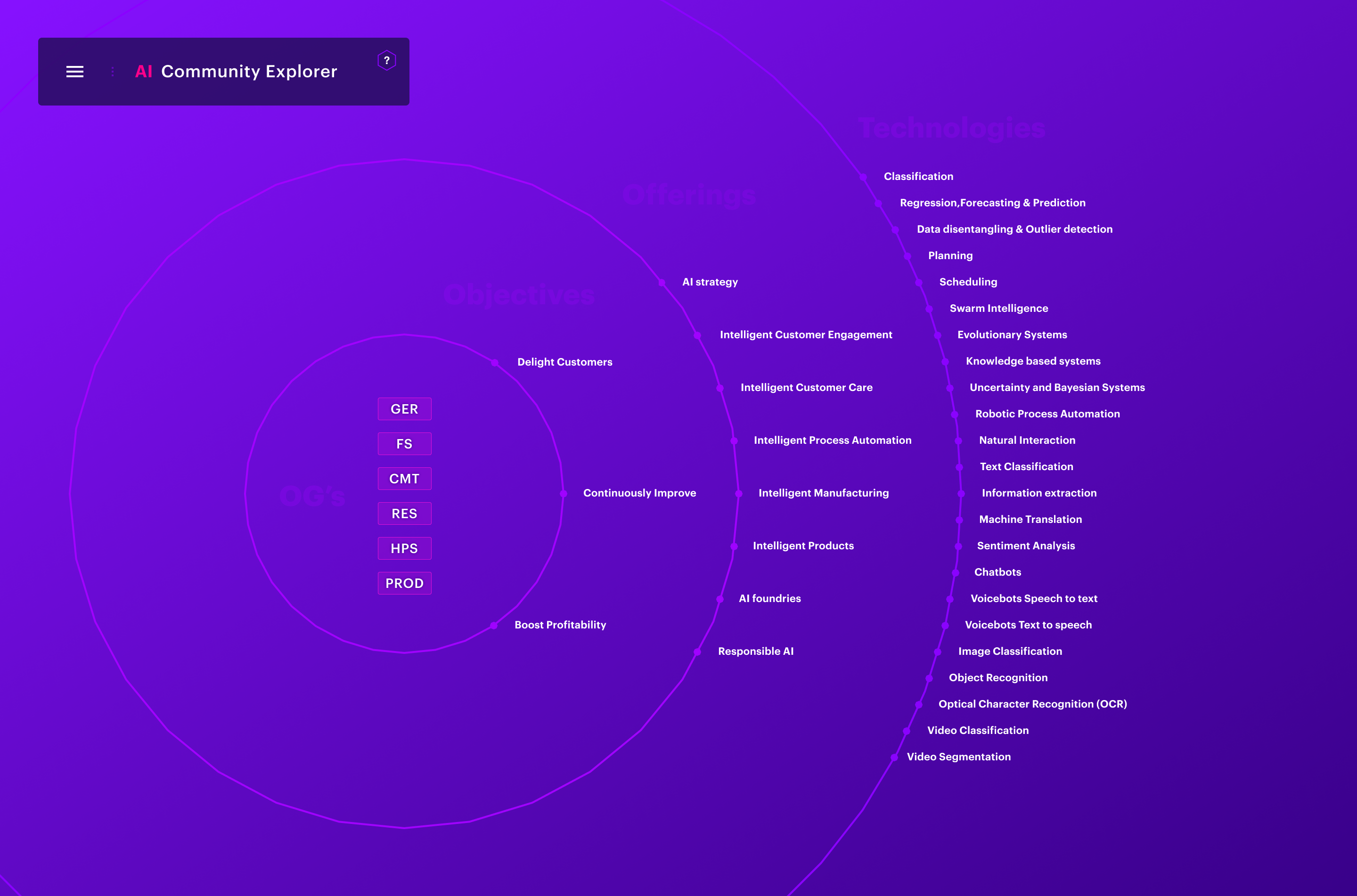
Visualising how initiatives, specialists, and resources connect to each other
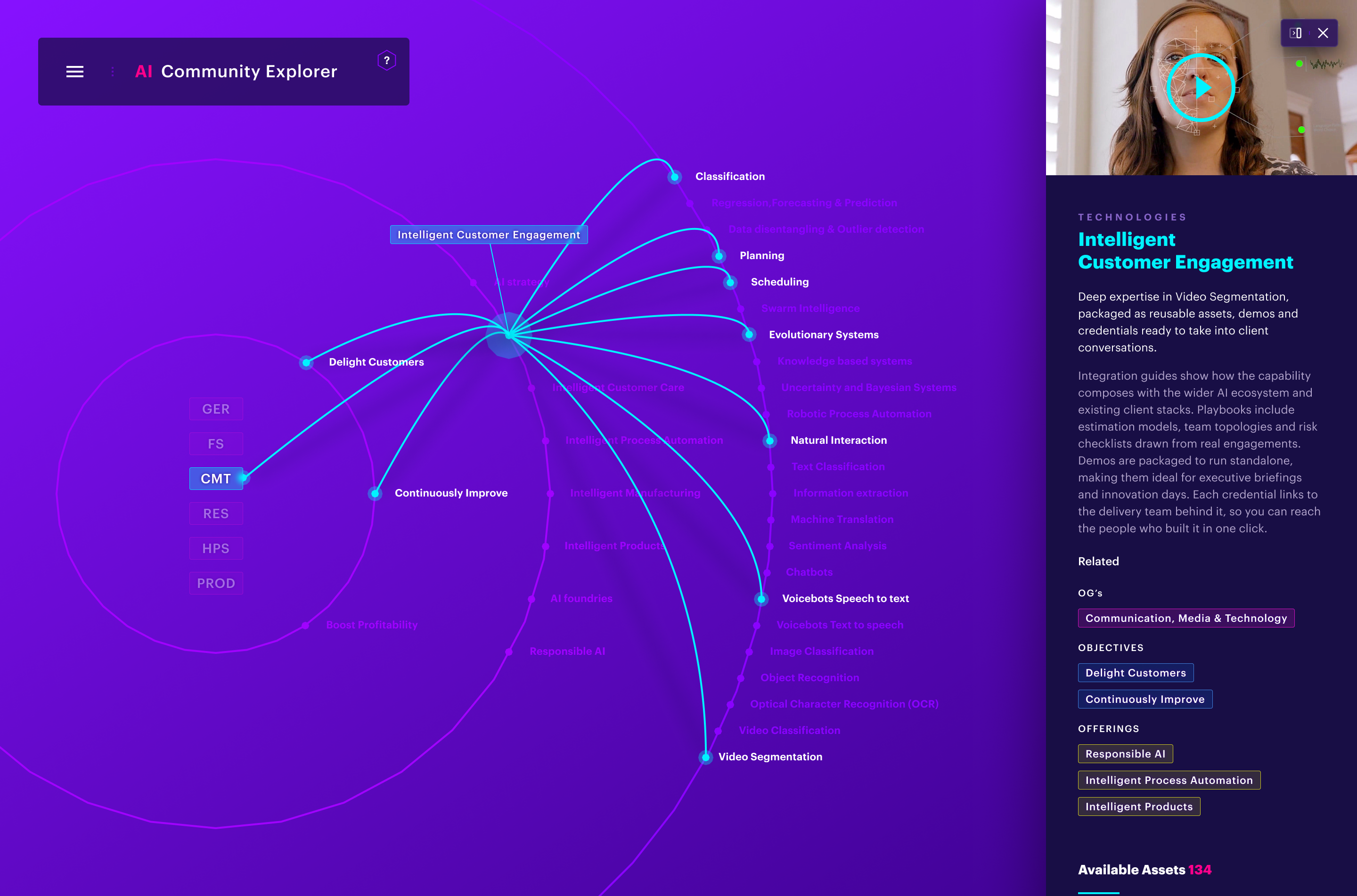
Contextual panel
To maintain orientation within a dense data map, each node opens a contextual side panel — surfacing key insights and related resources without breaking the user's flow.

Designing for Power Users
Built for technical experts already fluent in the domain, the interface skips traditional onboarding — prioritising fast access to the platform's navigation mechanics over guided introduction.
Assets layer
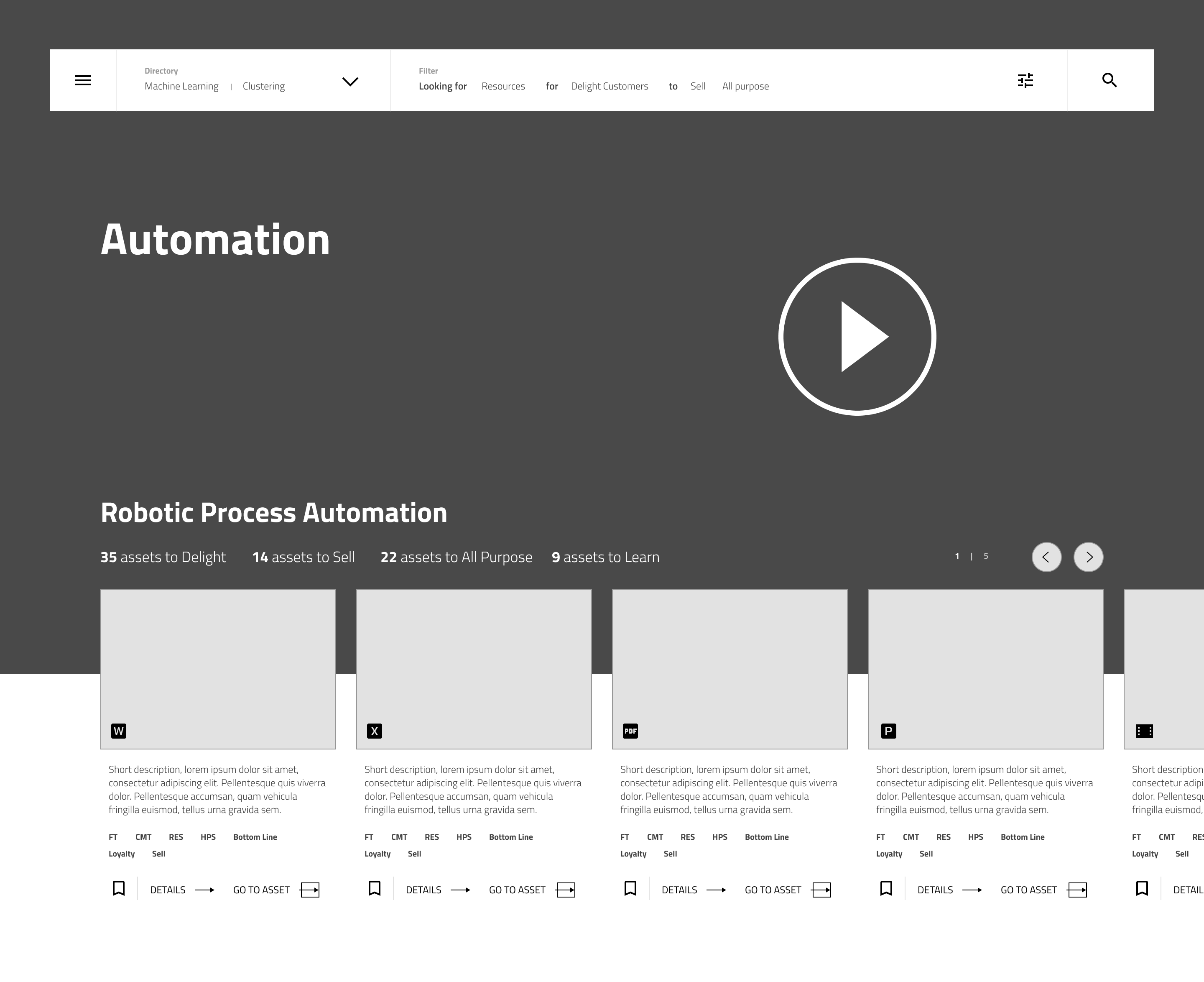
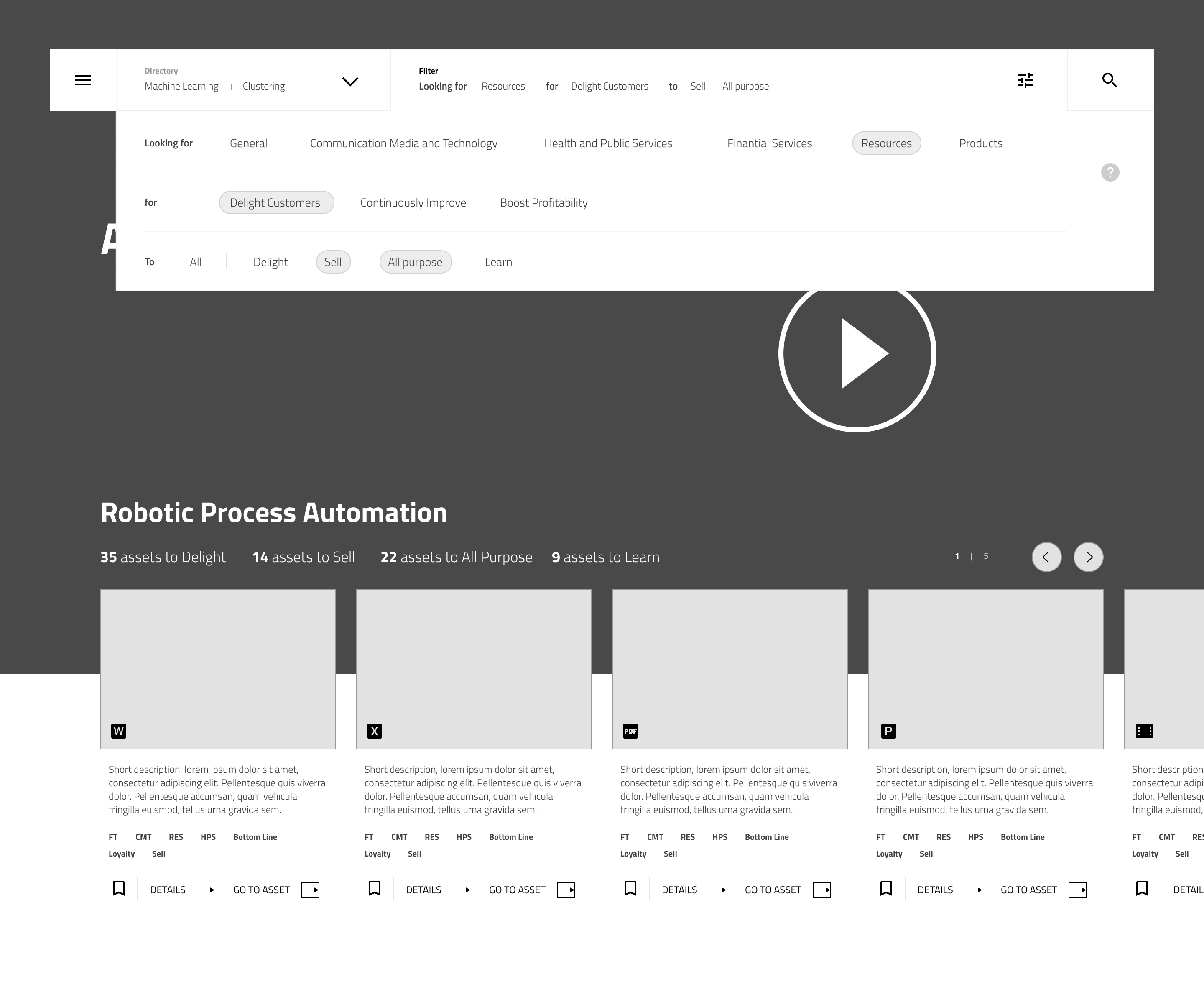
The Assets Layer shifts focus to pure utility, turning a large database into an easy-to-navigate repository. Early wireframes introduced 'narrative filtering' — letting users surface assets through natural, contextual search rather than rigid dropdown menus."
Assets Layer: UI Components
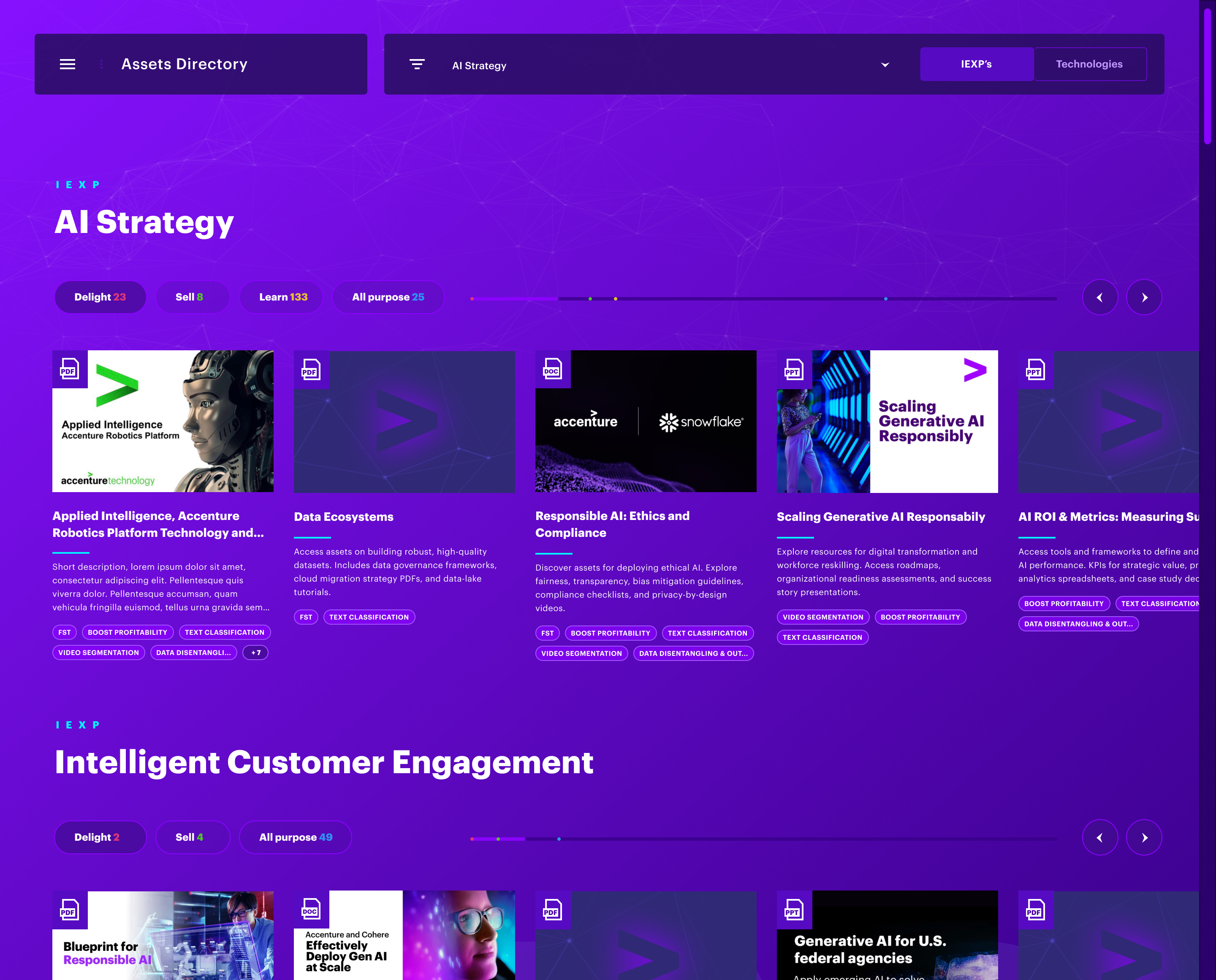
The Assets Directory: A centralized, high-density index designed for discovering AI tools and resources across the global ecosystem.
The Experts Directory: A streamlined index mapping internal AI specialists by domain expertise and business unit.

The Events Directory: A utility-first interface for tracking, filtering, and enrolling in upcoming global AI initiatives.



Get in touch
hi@pedroportugal.com


© 2026 Pedro Portugal
User Interface
Design Systems
Digital Products
Accenture AI
Data visualisation & UX
AI Community Explorer is an enterprise knowledge platform designed to map, connect, and scale Accenture's artificial intelligence initiatives globally. The work covers wireframing through to final high-fidelity UI, built in close collaboration with UX and product stakeholders. The ecosystem delivers a dynamic internal hub connecting global AI specialists, alongside a structured repository for enterprise case studies.
Client
Accenture
Role
Product Design
UI Design
Interaction Design
AI Explorer: Interactive Prototype
The Explorer uses dynamic data visualisation to reveal complex relationships between AI initiatives — designed at the intersection of logic and fluid interaction. As a personal extension of this case study, I designed and built a fully interactive version of the Explorer — from interface to functional prototype — using Claude Code.
Launch Prototype
Enterprise Scope: Tailored strictly for desktop environments and professional workflows. Minimum width: 1024px.
The Explorer Layer
To manage extreme data density, the UI employs a dual-experience framework: a macro-level visual map revealing the entire Accenture AI ecosystem at scale, paired with a micro-level utility interface for frictionless, deep-dive navigation into granular topic content.
UI foundations
Early user interface mapping the platform's data structure.
Visualising how initiatives, specialists, and resources connect to each other
Contextual panel
To maintain orientation within a dense data map, each node opens a contextual side panel — surfacing key insights and related resources without breaking the user's flow.
Designing for Power Users
Built for technical experts already fluent in the domain, the interface skips traditional onboarding — prioritising fast access to the platform's navigation mechanics over guided introduction.
Assets layer
The Assets Layer shifts focus to pure utility, turning a large database into an easy-to-navigate repository. Early wireframes introduced 'narrative filtering' — letting users surface assets through natural, contextual search rather than rigid dropdown menus."
Assets Layer: UI Components
The Assets Directory: A centralized, high-density index designed for discovering AI tools and resources across the global ecosystem.
The Experts Directory: A streamlined index mapping internal AI specialists by domain expertise and business unit.
The Events Directory: A utility-first interface for tracking, filtering, and enrolling in upcoming global AI initiatives.
Get in touch
hi@pedroportugal.com
© 2026 Pedro Portugal
User Interface
Design Systems
Digital Products
Accenture AI
Data visualisation & UX
AI Community Explorer is an enterprise knowledge platform designed to map, connect, and scale Accenture's artificial intelligence initiatives globally. The work covers wireframing through to final high-fidelity UI, built in close collaboration with UX and product stakeholders. The ecosystem delivers a dynamic internal hub connecting global AI specialists, alongside a structured repository for enterprise case studies.
Client
Accenture
Role
Product Design
UI Design
Interaction Design
AI Explorer: Interactive Prototype
The Explorer uses dynamic data visualisation to reveal complex relationships between AI initiatives — designed at the intersection of logic and fluid interaction. As a personal extension of this case study, I designed and built a fully interactive version of the Explorer — from interface to functional prototype — using Claude Code.
Launch Prototype
Enterprise Scope: Tailored strictly for desktop environments and professional workflows. Minimum width: 1024px.
The Explorer Layer
To manage extreme data density, the UI employs a dual-experience framework: a macro-level visual map revealing the entire Accenture AI ecosystem at scale, paired with a micro-level utility interface for frictionless, deep-dive navigation into granular topic content.
UI foundations
Early user interface mapping the platform's data structure.
Visualising how initiatives, specialists, and resources connect to each other
Contextual panel
To maintain orientation within a dense data map, each node opens a contextual side panel — surfacing key insights and related resources without breaking the user's flow.
Designing for Power Users
Built for technical experts already fluent in the domain, the interface skips traditional onboarding — prioritising fast access to the platform's navigation mechanics over guided introduction.
Assets layer
The Assets Layer shifts focus to pure utility, turning a large database into an easy-to-navigate repository. Early wireframes introduced 'narrative filtering' — letting users surface assets through natural, contextual search rather than rigid dropdown menus."
Assets Layer: UI Components
The Assets Directory: A centralized, high-density index designed for discovering AI tools and resources across the global ecosystem.
The Experts Directory: A streamlined index mapping internal AI specialists by domain expertise and business unit.
The Events Directory: A utility-first interface for tracking, filtering, and enrolling in upcoming global AI initiatives.

© 2026 Pedro Portugal
User Interface
Design Systems
Digital Products
Privacy Policy
Get in touch
hi@pedroportugal.com


